Release date: December 2, 2026
New Features
Sort staff in attendance overviews and timesheets
The attendance overview can now order the staff of each position by surname, first name, rating or sign-up time. Custom timesheet templates can sort a whole shift as well.
To-Dos for several admins
A To-Do can now be assigned to several admins at once. Each of them sees it among their To-Dos and receives the reminder email.
Applicants in the message recipients filter
The recipients Quick filter in messages now also offers the applicants of a position, leaving declined applicants out by default. Each chip shows how many of its people are recipients, for example 8/10.
Public API
Invoice payments endpoint
Version 2 of the Public API introduces /api/v2/invoicePayments, which lists the payments of all invoices, optionally together with their invoice, and deletes payments just like the admin.
A clear reason when an order cannot be deleted
Deleting an order that cannot be removed now returns the reason instead of an empty error list.
Improvements
Clearer order in the builder
Confirmed staff members are now listed above those awaiting confirmation, and applicants are grouped by status.
Edit invoice emails before sending
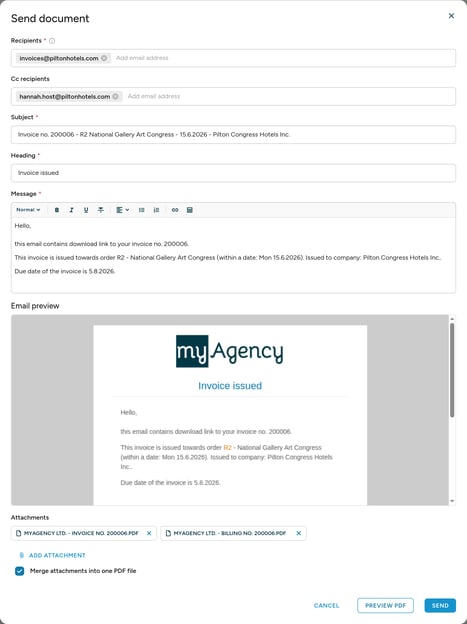
Send on invoices and credit notes now opens an email dialog where you can edit the recipients, subject, heading, text and attachments, with a preview of both the email and the PDF.
Edit payment receipt emails
Send receipt opens an email dialog too, so the recipients, subject, heading and text can be adjusted before the payment receipt goes out.
Notification bell follows your channel settings
The Staff portal hides the notification bell when the Interactive notification channel is turned off for all staff member notifications.
More from the new invoice table
The new invoice table adds a last sent column and filter, shows amounts in the invoice currency, fills wide screens, keeps its page and scroll position on reload and comes with translated menus.
API uploads marked on the invoice detail
The invoice detail shows "via API" when the PDF was uploaded through the Public API.
Bug Fixes
- Crew chief pricelist: a time range added on the crew chief tab of a pricelist can be filled in right away.
- Shift change emails: the "Changes in your shifts" email lists the shifts in each section from the earliest to the latest.
- Payout methods: staff members added to a shift or as applicants get their payout method when they have a single valid payout method that day.
- PDFs in the installed app on Android: when OnSinch is installed as an app on an Android device, calculation, price quote, accreditation and attendance overview PDFs download as PDFs, not as the order page.
- Builder icons: staff members on a shift that is not closed yet show the attendance pending icon instead of the pending invitation icon.
- New ratelist conditions: deleting a badge or attribute used in a condition of the new ratelists warns which ratelists are affected, and a new job follows the pricing system of its order.
- Price & wage builder: copied ratelists start as drafts, the closing form can bulk-set any ratelist, and ratelist migration, override dialogs and condition labels work as expected.
- Country names: the country list shows the correct names of Chad, Liechtenstein, El Salvador, Eswatini and four other countries that were misspelled or outdated.
- Deactivated pricelists: deactivating a pricelist in its edit form moves its companies back to the Basic pricelist, including companies affected earlier.
- Linked shifts in the Staff portal: once signed up for a shift, a staff member sees only the linked shifts they are on, without the "You will be signed up for this shift" note.
- PDF file names: PDFs saved from the browser keep the spaces and brackets in their names on every device, and accented letters only lose their accents.
- Approving applicants: approving an applicant no longer fails when the rest time after the shift is negative or the minimum rest time setting has decimals.
- Fio payouts: paying out through Fio with an expired or inactive token now tells you the token needs renewing, instead of warning that the bank may have accepted the payments.
That's all for this release. Your feedback shapes what comes next, so let us know how these changes work for you, and if anything is unclear, our support team is happy to help.