Release 3.2.142 adds an email preview for client documents, one-click sent email details in order history, and invoice refinements.

Release date: November 18, 2026
New Features
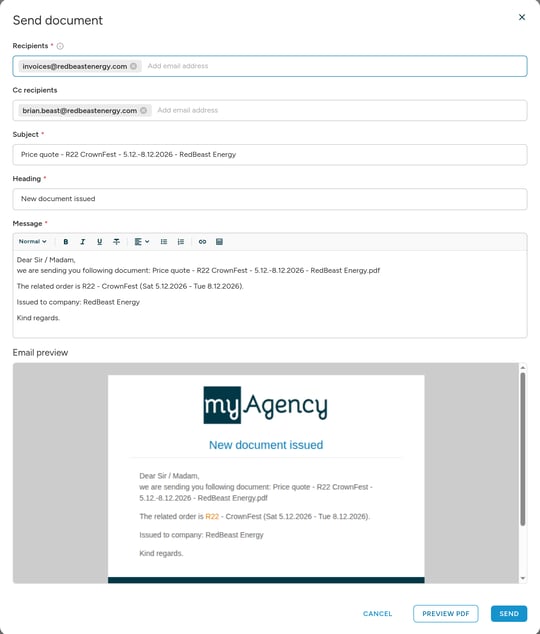
Edit client document emails before sending
Clicking Send on a calculation, price quote, accreditation, timesheet or attendance overview now opens a dialog where you can adjust the recipients, subject, heading and text. An email preview lets you check the message before it goes out.
Public API
Staff changes made through the API on the timeline
Staff members created or edited through the Public API, including changes to their attributes, now appear on the staff member's timeline marked as changed via API.
More consistent wallets endpoint
GET /api/v1/wallets has been rebuilt behind the scenes. Invalid filter values now answer 400, and the status filter no longer returns archived wallets. With with=PaymentMethod, a wallet without a payment method returns null instead of an object of empty fields. A wallet of a staff member without the staff role stays listed in with=Worker results, as well as in the admin wallet detail and the wallet export.
Improvements
Sent emails in the order history
A sent email in the History & comments of an order or job now opens its detail, with the text, copy recipients and attachments, in one click. The new Sent messages filter lists the sent messages on their own.
The invoice table remembers where you left off
The new invoice table reopens on the view, filters and page you left. Invoice links in the menu, on the dashboard and in the company detail open it already filtered.
Due dates in the company export
The company export now offers the default invoice due date and the default pro forma due date.
Bug Fixes
- Staff rating: ratings, the rating coefficient and late arrival penalties accept only whole numbers, so a fractional rating no longer breaks the app.
- Newly approved staff members: a staff member sees available shifts in the staff app as soon as their profile is approved, without logging out and back in.
- Addresses: for staff members, places, agency invoice addresses and company addresses, the country has to come from the country list and the region has to belong to it, in the admin forms as well as in the Public API. Changing the country clears a region of the previous country.
- Staff profile approval: approving a staff member's new address country and region no longer fails.
- Invoice PDFs: the page footer of invoice, pro forma and credit note PDFs no longer covers the last rows of a long invoice.
- Client portal: renaming a job priced by new ratelists that already has a confirmed shift is saved as a pending change for admins again, instead of ending on an error page.
- Bank account numbers: pasting a whole bank account number without spaces now fills the right fields for Australian, British, Danish, Italian and US accounts.
- Shift closing: a break outside the arrival and departure time is now marked in the Break cell, with a message explaining why closing cannot continue.
- Calendar sync: the crewboss phone number no longer appears in the synced staff calendar when the agency hides it from staff.
- Contract preview: the preview shows the "password-protected PDF" message again instead of an error page.
- Date of birth: an unreadable date of birth is rejected at sign-up instead of being saved as 1. 1. 1970, and the Scheduler staff detail shows a missing one as a dash.
- Builder: editing the locations of several jobs at once lists the place names to choose from instead of their IDs.
- Document settings: the pro forma and credit note previews show their own texts instead of the invoice texts.
That's all for this release. Your feedback shapes what comes next, so let us know how these changes work for you, and if anything is unclear, our support team is happy to help.