Release 3.2.140 brings upcoming salary to the staff app, profession-based shift alerts, plus fixes for contracts, newsletters and payouts.

Release date: November 4, 2026
New Features
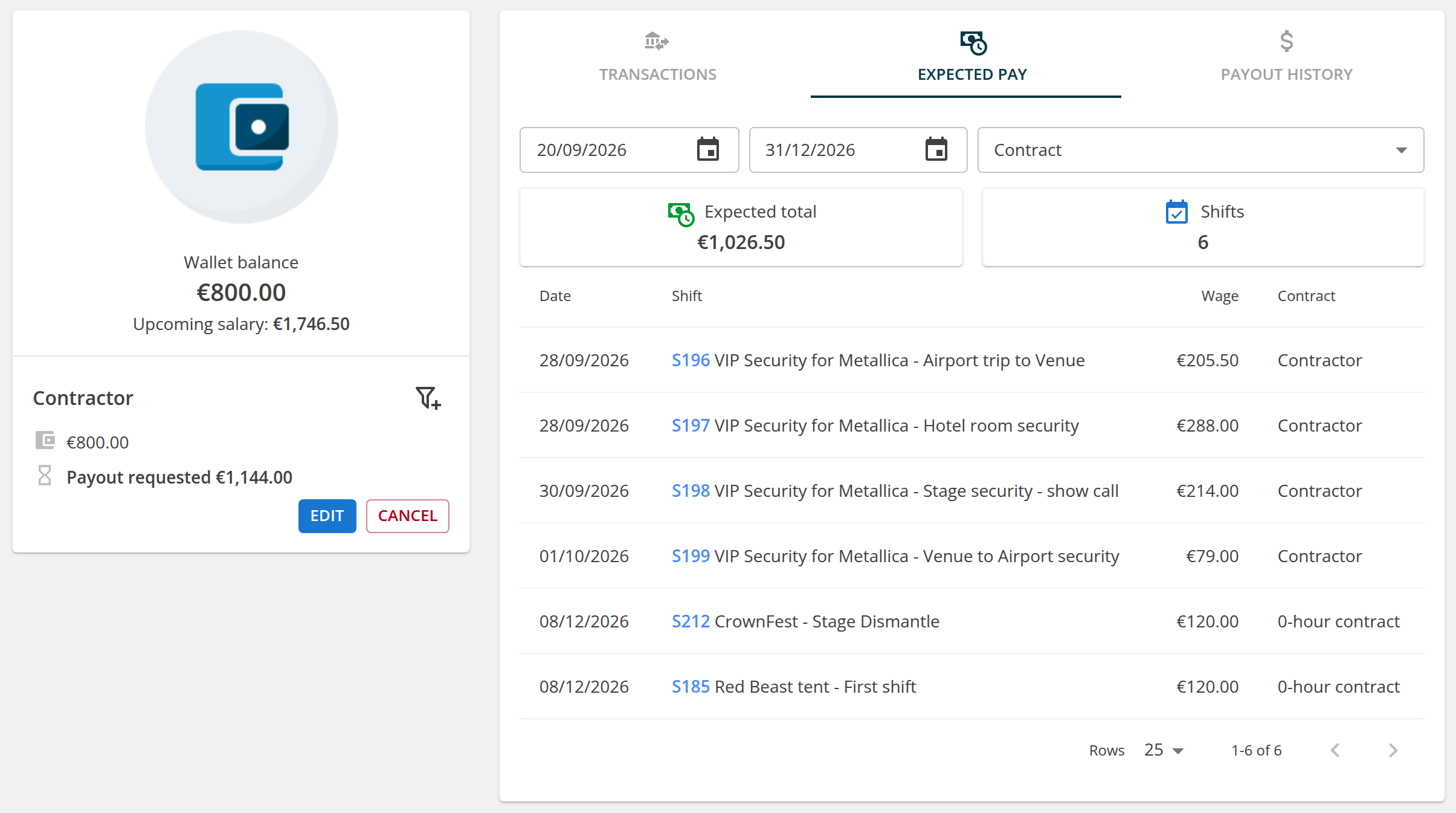
Expected pay in the staff wallet
Staff members can now see what they are about to earn. The wallet overview shows the upcoming salary: the wages of the shifts they are booked on or have already worked that are not yet closed and paid into the wallet, including transport wages where the transport module is on. A new Expected pay tab on desktop (a section on mobile) lists these shifts with their date, name, wage and contract, filtered by date range and contract, together with the total and the number of shifts for that filter. None of this is shown when the agency hides wages and the wallet from staff.
Shift push notifications limited by profession
Push notifications about new shifts can now be limited by profession. The selection comes pre-filled with the professions of the order's positions, so the right people hear about the right shifts.
Improvements
Placeholders in the "New document issued" email
The greeting and the signature of the "New document issued" email (sent with calculations, billings, price quotes, accreditations, timesheets and attendance overviews) now accept placeholders in the email editor like the rest of the text. A new Document file name placeholder inserts the name of the attached file. Texts customised earlier keep working unchanged.
Pending invitations on the Overlapping attendance page
Conflicts with a shift the staff member was only invited to and has not confirmed yet are now marked with the yellow "pending confirmation" icon, both on the Overlapping attendance page and in its dashboard widget. A new "Hide conflicts with pending invitations" checkbox, remembered per admin, hides them so you can focus on real double bookings of confirmed staff.
Public API
Contracts endpoint rebuilt, with stricter filtering
GET /api/v1/contracts has been rebuilt behind the scenes and returns the same response, filters, sorting and pagination as before. Filter handling now follows the stricter rules shared by all list endpoints (introduced in 3.2.135): a value that does not fit the field (id=abc, status=0.5, valid_from=2026-01-01T10:00:00), an unknown operator or an empty value on a field that cannot hold one answers 400 with a clear message instead of an empty or unfiltered list. Filtering by the badges of the embedded staff member (with=Worker__BadgeWorker&BadgeWorker__id=...) works, and the embedded Worker has the same shape as on GET /api/v1/workers: badges the staff member no longer holds are not listed, and an empty bank account number is null. The DocumentSignature block is now a list on every endpoint that embeds a contract, as the schema documents; GET /api/v1/wallets/detail with with=Worker__Contract__DocumentSignature used to return a single object. A contract signed through two providers is listed once with its newest signature, and a contract of a staff member who no longer holds the staff role stays listed and counted when with=Worker is requested. On the admin side, the contract detail, termination, export, download and history find such a contract again instead of treating it as missing, and the contract export writes empty personal columns for a staff member without profile details instead of failing.
Only documented endpoint URLs are answered
Only the documented spelling of an endpoint URL is answered. A trailing slash (/api/v1/orders/), a doubled slash, a .json, .csv or .pdf extension or a capitalised endpoint name (/api/v1/Orders) now answers 404; those spellings used to run the endpoint without the request body check on writes and without the documented value types on reads. The attachment endpoints POST and DELETE /api/v1/orders/{orderId}/attachments and /api/v1/jobs/{jobId}/attachments are now validated too: an upload without the file[] part answers 400 instead of an empty success, and an Accept header asking for CSV or PDF gets the JSON response instead of an error.
Regular validation response for malformed row IDs
A write request whose row id is a list or an object now answers the regular 400 validation response, with the row's errors keyed by its position in the batch, instead of failing with an error.
Bug Fixes
- New ratelists, US federal holidays: the list now always offers the observed day of all five fixed holidays (New Year's Day, Juneteenth, Independence Day, Veterans Day, Christmas Day), each dated on the next year the holiday falls on a weekend, so it can be left out ahead of time and an earlier exclusion stays visible. Before, an observed day was offered only when the holiday's next occurrence fell on a weekend. Leaving out a holiday no longer leaves out its observed day with it, as 3.2.139 did; the two are left out independently, as the list shows.
- Newsletters: an image inserted from a file through the email editor now shows in Gmail, both on the web and in its mobile apps, instead of its file name. The image travels as part of the email rather than being written into its text.
- PDF titles: PDFs rendered from custom document templates (client and staff timesheets, billing calculations, price quotes and the editor preview), composite cards, the staff shift detail and merged invoice attachments now carry the document name as their PDF title. Chrome shows that name in the tab and uses it when saving, instead of
view_pdf.pdf. - Contracts: a password-protected or edit-restricted PDF can no longer be uploaded as a contract type document; the upload and the previews now show a message instead of crashing. A contract whose document cannot be generated is no longer reported as saved.
- Companies: deleting a company is now recorded in the history with who deleted it and when, so a removed company can be traced. OnSinch support can look it up, together with all other history across the agency, in its new audit log.
- Agency settings: agencies using the US date and time format can save the settings again; times such as the default shift beginning and the attendance reminder time window entered as 8:00 AM / 6:00 PM were rejected as invalid.
- Staff profile: a profile declined in the profile review now shows a red "declined, waiting for the staff member's changes" notice with the decline message on the staff member's page, instead of the same "ready for review" notice as a new profile.
- CMS pages: a page link without the role part of the address (e.g. /CmsPages/view/welcome, often written by hand into page content) now opens the page for the signed-in admin, client or staff member if their role may see it. Before, it always showed "Invalid cms page" and returned to the dashboard.
- Profile attribute approvals: approving an attribute with an expiration date from the old "Attributes to approve" page no longer ends with an error after the approval was saved.
- Staff list: removing the first of several requirements in the filter (for example after "find suitable staff" on a shift with multiple requirements) no longer drops the whole requirement filter and no longer lists staff members who do not meet the remaining requirements.
- Payouts: paying staff members through the Fio bank connection shortly after midnight no longer fails with "the payment date is in the past", and a payout marked as paid shortly after midnight no longer gets the previous day's date. Both now use the agency's local date.
That wraps up this release. As always, we welcome your feedback, and if you have questions or need a hand with any of the above, our support team is ready to help.