Release date: October 14, 2026
New Features
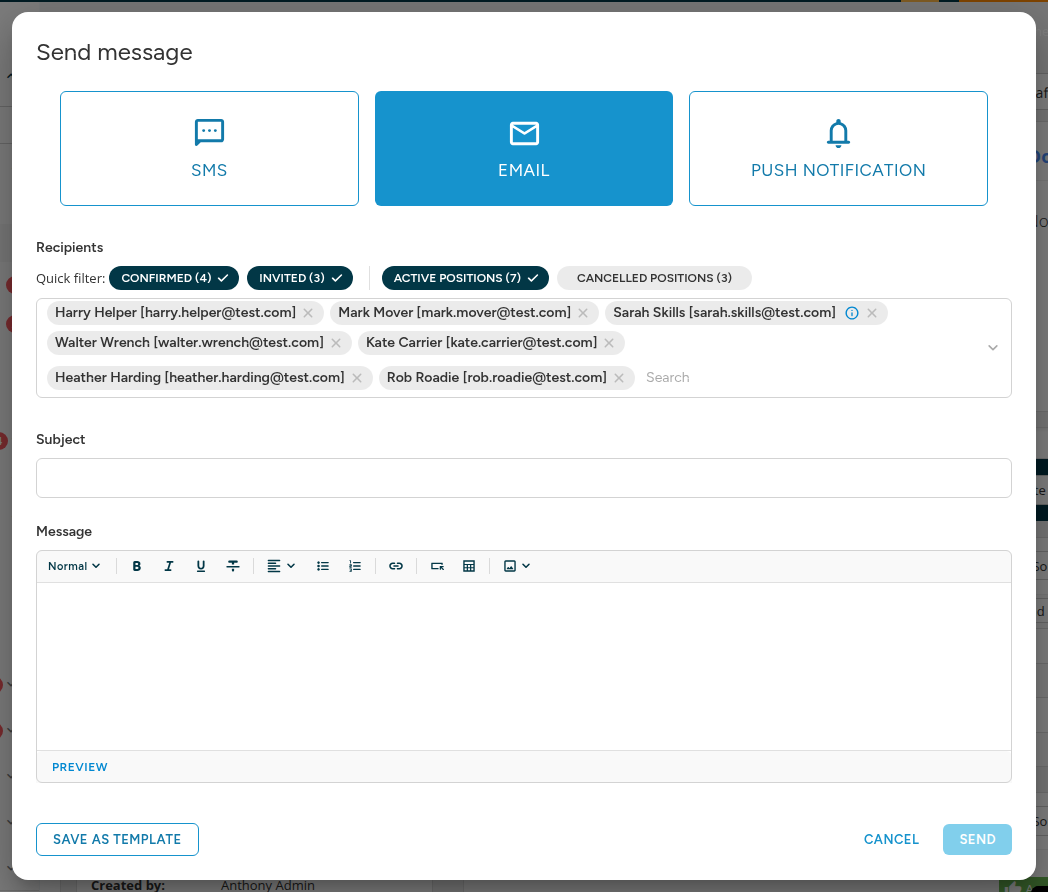
Quick filter for job message recipients
Job messages now offer a Quick filter right above the recipients. In a couple of clicks, you can narrow the audience to confirmed or invited staff, and to active or cancelled positions.
Public API
Clock-out notes with staff clock-ins
The staff clock-ins endpoint accepts a note for each row, saved as the attendance's clock-out note: the same note a staff member writes when clocking out in the app, handy for recording breaks, for example. A new note replaces the existing clock-out note, an empty value removes it, and leaving the field out keeps it as it is. Other attendance notes stay untouched, and each response row now lists every note of the attendance.
Consistent paging on list endpoints
Paging through list endpoints now stays consistent from page to page, even when several rows share the same sort value, whatever the sort order. The payments grouped by staff member endpoint returns every payment ID of each row together with the newest requested date, and orders rows by their most recent payments. Sort directions in the pagination details are reported in lowercase across all list endpoints.
Bug Fixes
Reopening shifts
Reopening a shift no longer fails with an error when another shift with the same staff members is being closed or reopened at the same time.
We welcome your feedback on this release. If you have any questions or need assistance, please reach out to our support team.