Release date: September 16, 2026
New Features
Break Penalty Unit in the Price & Wage Builder
The price & wage builder gains a break penalty unit. A missed rest break adds a penalty valued from the rates in force at that time; where rates are stacked, each adds its own line, and rates that touch each other are charged once, from the higher one.
Default Due Date for Pro Forma Invoices
Pro forma invoices now have a default due date of their own. The existing agency setting is now labelled "Default amount of days for regular invoice due date" and applies to regular invoices only, while a new "Default amount of days for pro forma invoice due date" setting (14 days until changed, so nothing moves on its own) prefills the due date of new pro forma invoices.
The company form gets a matching pro forma override next to the existing per-company due date, shown on the company detail and in its history. Both per-company values accept whole numbers of days only, and 0 now means the invoice is due on the day it is issued instead of being ignored.
Attendance Notes
A note can now be written on a single attendance directly from the job detail, through the "Add note" item in the three-dots menu of every attendance, without changing its presence status. Until now a note could only be added from the attendance overview, or as a side effect of excusing an absence. The note dialog is the same wherever it is opened from and now shows the notes already written on that attendance above the field for a new one, each with who wrote it and when, and who last changed it; notes are written in a multi-line field everywhere, the absence excuse included.
A new "Attendance notes" screen under Attendance lists every note together with the staff member it is about, the shift, who wrote it and when, and who last edited it. The list can be filtered by note type, staff member, job, author, date range and note text, sorted by type or date, and any note an admin wrote can be corrected straight from it.
The shift closing form also shows the admin notes on the staff member's row next to the crew boss excuse and the clock-out message, so whoever closes the shift sees what was agreed beforehand. Notes keep appearing in the wallet, billing and attendance exports as before.
Hours, Breaks and Position Status in Custom Timesheet Templates
Custom timesheet templates for clients and staff can now print the hours and breaks stored on each attendance, the breaks planned on each position and the position status. On a closed position the hours are the same figure the invoice and the payroll use, so a sheet no longer has to show the shift time without the break deducted; on a position that is not closed yet they are the planned figures, and the template can tell the two apart.
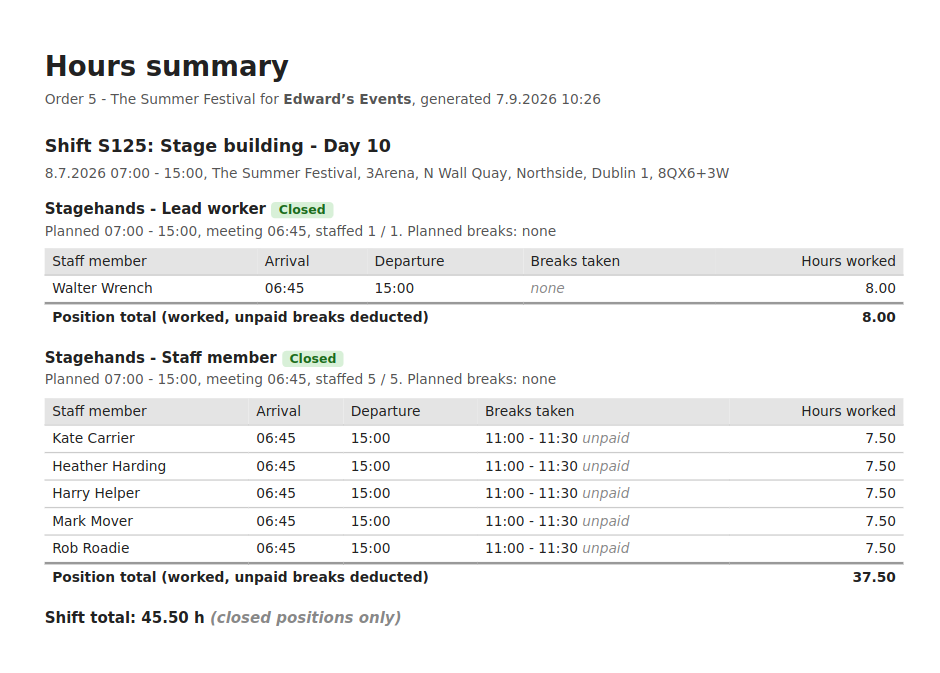
The template editor's reference panel lists the new fields, its preview shows an open and a closed position, and the starter template prints breaks and hours per staff member.
Pending Profile Changes Shown in the Staff Member Edit Form
The staff member Edit form in the administration now shows when a field has a profile change submitted by the staff member that is still waiting for review. The submitted value and its date appear under the field, together with a link that opens the review dialog, so an admin no longer overwrites a proposed value without knowing about it.
The banner at the top of the form gains a Review changes button, mentions a pending photo change and lists pending changes to fields the form does not show, such as attributes hidden by profession.
Public API
Creating Jobs with Ratelists
Jobs can now be created through the Public API with the new ratelists. POST /api/v1/jobs and POST /api/v1/orders accept a price_ratelist_id and wage_ratelist_id pair on the job. The API checks that the ratelists exist, are active and are of the right type, that they are not combined with the legacy pricelist_category_id, and that the company of the order may actually be charged and paid by them. Only the ratelists the admin interface offers can be assigned: a ratelist restricted to other companies is refused, and so are inline rate overrides and superseded revisions.
No More Jobs Priced by Both Systems
A job can no longer end up priced by a pricelist category and a ratelist pair at the same time. Putting a pricelist category on a job that is already priced by ratelists, through PATCH /api/v1/jobs or any other edit, was silently accepted whenever the order held no other job.
Improvements
Mail Queue Housekeeping
Emails waiting in the mail queue can once again be deleted one at a time, instead of only all at once. The queue page also no longer shows the separate older section below the list, which no longer receives any email.
Faster and Safer Builder Saves
Saving several positions at once in the builder, with several shifts selected in the tree, no longer fails when another admin or a staff member is working on the same job at that moment. Saving a position also does less work behind the scenes, because the team status is only recomputed when one of the values it depends on has changed, so saves of larger teams are faster.
Bug Fixes
- Payout method assigned only after signature: When a contract is sent for electronic signature with the option to assign a payout method to wallet entries and attendances ticked, the payout method is now assigned only once the staff member signs the contract, not while it is still waiting for the signature.
- Reminders for unpaid pro forma invoices: Clients are now reminded of unpaid pro forma invoices as well. The daily due date alert never went out for a pro forma invoice due that day, and a client whose only overdue documents were pro forma invoices was skipped by the weekly overdue reminder and missing from the agency's weekly overdue overview.
- Shift Size effect on copied and published shifts: The Shift Size effect (surcharge and bonus depending on the number of people on a shift) is applied again on shifts created by copying or newly published from the builder. Since 3.2.130 the crew boss position of such shifts was priced as if the shift were empty until it was resaved.
- Declining many applicants at once: Declining many applicants at once, for example "decline all" on a large shift, no longer fails with an error, and staff members applying to that shift are no longer blocked from saving their own settings while the decline is being processed. The decline is saved first and the notifications and timeline entries follow, so a problem while sending notifications no longer reverts the decline.
- Tags of a closed position: The tags of a closed position can no longer be changed from the tag picker on the job page. The wages of a closed shift are final, so removing or adding a tag there changed nothing about pay while reporting "Tags saved."; the picker now refuses with a message, the same way the shift editor already does. Unclose the shift to change its tags.
- Login history dates: The Login history screen shows the date and time of every login again. For admins using Czech and other languages that write dates with dots, only logins on the 25th to 31st of a month had a date; the rest of the column was blank.
Attendance notes are the thread running through this release, from the job detail to the shift closing form, and we would like to hear how they fit your routine. Should you have any questions or need assistance with any of the changes above, please reach out to our support team.