Release date: September 2, 2026
New Features
New Ratelist Overrides per Position
Pricelists and wagelists can now be overridden for a position and for each transport of a trip straight from the shift form, the same way as on a job. The override dialog gained a collapsible preview of how the prices and wages change with the ratelist being edited, updated as you type and without saving anything. Position rows in the rates composition table also show an indicator when the position uses a different pricelist or wagelist than its job, just as attendance rows already do.
Sortable Staff in the Scheduler Shift Detail
Staff members listed in the shift detail in the Scheduler can now be sorted, and the list newly comes sorted by surname by default instead of in the order the people were added to the shift.
Company Hovercard in the New Interface
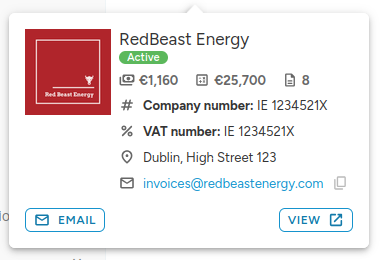
The company hovercard known from the old interface has been rebuilt in the React frontend: logo, status, address, registration and VAT number, invoice e-mail and phone (both copyable), overdue obligations, everything invoiced so far, the number of orders and the company's important attributes, with buttons to e-mail the company or open its profile.
Public API
Badge Embeds Now Reflect Only Held Badges
Endpoints that embed staff badges via ?with=BadgeWorker (the workers list and the wallet detail) now return only the badges the staff member currently holds, and badge filters match held badges only. A badge that has switched off is no longer reported or matched: a negative badge such as Newbie that expired by exceeding its point limit, or a badge whose points dropped below its threshold.
A Proper 404 for Unknown Endpoints
Requests to an unknown Public API endpoint, for example a mistyped /api/v1 URL, now return a proper JSON 404 response instead of an HTML error page.
Improvements
Reworked Search Dropdowns
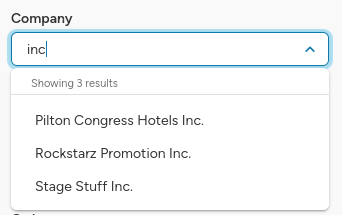
Search dropdowns load the first 30 records sorted by name and state above the options how many records are shown and how many are picked. Multiselect dropdowns stay open after a pick and clear the typed text, so several records can be searched and selected in a row. The placeholder now reads "Search" when the field searches the server and "Select" when the list is already loaded, and the search icon remains only on the fulltext search field.
Filters on the Tag Management Page
The tag management page can now be filtered by the tag active state and narrowed to tags that have prices set. The chosen filters stay applied while sorting and browsing the pages of the list.
Bug Fixes
- Profile-change notifications: The staff profile-change notification no longer reports fields that were not touched. Editing a staff member with no bank account filled in used to report "Bank account" as changed and email every subscribed admin a row with no value in it, and the same phantom change could also un-approve a verified profile.
- Blind-copied recipients: Recipients blind-copied (BCC) on emails, such as the agency copy of invoice emails, are no longer visible to the other recipients of the message.
- Records saved in bulk: Records saved in bulk, such as queued mass messages and automatically assigned badges, no longer turn a zero or an empty text value into missing data.
- Date chips in position lists: The missing date chip in position lists is back when a featured position falls on the same day as the first positions in the list.
- Pages left open across a release: A page left open across a new release now asks to be reloaded when it has gone out of date.
- Badge requirement filters: Newly created badges appear in the position requirement filters right after saving, and deleted badges disappear immediately; previously the filter offered a stale badge list for up to half an hour. Badges newly awarded to a staff member, or taken back when a team is reopened, are also reflected on their badge detail right away.
As always, we welcome your feedback on this release. Should any of these changes raise questions, or should you need assistance putting them to work, please reach out to our support team.