Release date: August 26, 2026
Staff Profile Approval
Profile approval itself is not new to OnSinch: administrators have long reviewed a newly filled staff member's profile before clearing it. This release takes that process substantially further. The review experience has been rebuilt around new dialogs, and, most importantly, approval no longer ends at the first sign-off: changes to guarded attributes on an already-approved profile now go through admin review as well.
Changes to guarded attributes now require approval
Both System & Profile attributes can be marked with Approval required, meaning their values are subject to verification. When an approved staff member edits such an attribute, the new value does not take effect right away; it is queued as a pending change, and the staff member sees a "Pending changes" notice in their profile until an administrator has reviewed it. Everything else about the profile keeps updating instantly, exactly as before.
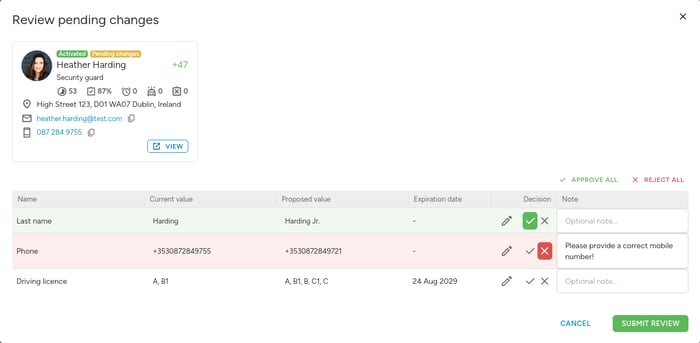
The new Review changes dialog
A staff member with pending changes appears on the Unapproved profiles page with a distinct "Pending changes" label. Opening the new Review changes dialog shows every pending change at a glance, and each one is decided individually: approve it, reject it, or adjust the proposed value before approving, so an obvious typo does not need another round trip with the staff member. Approved values land on the profile, rejected ones leave the current value untouched, and the staff member receives an email summarizing what was accepted and what was not.
A new dialog for the initial approval, too
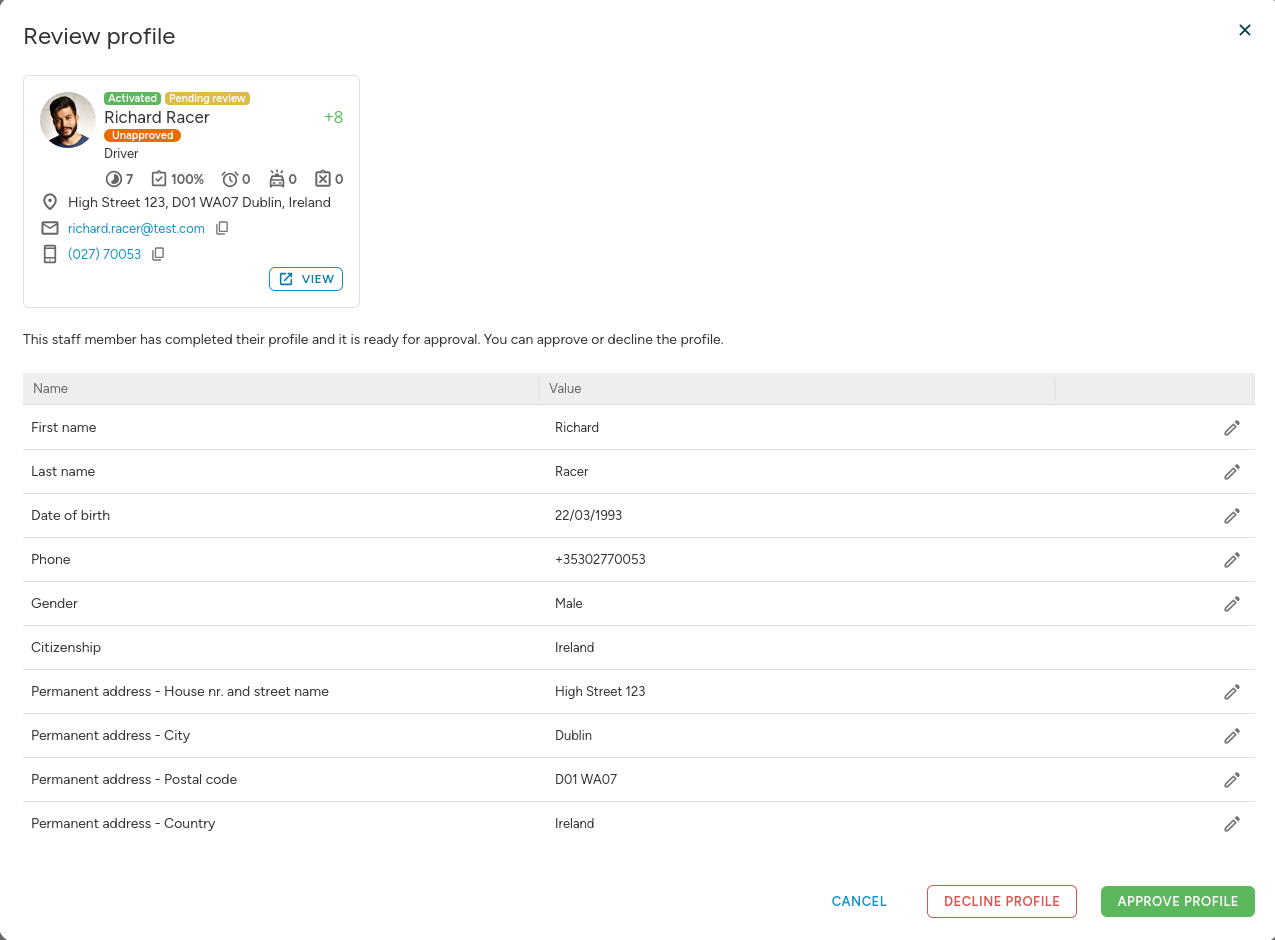
Reviewing a newly filled profile now happens in a new review dialog as well. It lists all attributes required for approval together with their values, so the decision can be made without hunting through the full profile, and offers the same three-way choice: approve the profile, decline it, or edit it directly. An optional message travels with the decision, reaching the staff member by email and, in the case of a decline, in an info panel in their profile. Declining never deletes or rolls back the staff member's data.
One list, one audit trail
The Unapproved profiles page now carries both kinds of review, newly filled profiles awaiting their initial review and approved profiles with pending changes, distinguished by reason labels and a matching filter. An accidental approval can be reversed with "Change profile to unapproved", and every approval, decline and reviewed change, including the administrator's message, is recorded in the staff member's history.
Public API
Wallet Tags on the Wallet Endpoints
The wallet detail endpoint (GET /api/v1/wallets/detail) now always returns the tags assigned to each wallet record as a WalletTag list with id, name and description, so manual wallet records can be allocated to the right cost category. The detail endpoint can be filtered by tag fields directly (for example ?WalletTag__name=...), and the wallets list endpoint supports the same tag filters and embeds the tag records via ?with=WalletTag.
Fixed Embeds on the Invoices and Wallets Endpoints
Two with embeds that previously failed with a server error now work as documented. The invoices endpoint (GET /api/v1/invoices) can embed the company's account manager via ?with=Company__AccountManager, and the manager's roles via ?with=Company__AccountManager__Role, in the same shape as the users and companies endpoints; a company without an account manager returns null for the embed. The wallets endpoint (GET /api/v1/wallets) can again embed contract document signatures via ?with=Worker__Contract__DocumentSignature.
Improvements
Performance Improvements
Recurring background tasks now put less load on the system, leaving more capacity for your day-to-day work and improving overall responsiveness of the application.
File Size Shown in Upload Dialogs
The profile picture and company logo upload dialogs now display the maximum allowed file size (10 MB) alongside the image format and dimension requirements, and files over the limit are rejected during upload with a clear message.
Bug Fixes
- Duplicate wallet tag names: Adding or renaming a wallet tag to a name that already exists now shows the validation message "Tag with this name already exists" instead of pretending the tag was saved or failing with a server error. Assigning tags to wallets by name still reuses the existing tag as before.
- Billing rows without billed hours: Billing rows of staff members with no billed hours, for example absent staff members, no longer show a confusing time range that could end before it starts; a dash is shown instead of the start and end times.
- Double billing prevented: Closing the same shift from two admin sessions at the same time can no longer bill the shift twice; the second attempt is now reliably stopped and reports that the shift is already closed, even under heavy database load.
As always, we welcome your thoughts on this release. If you have any questions or need a hand with any of these changes, our support team is ready to help.